Connectivity to BigQuery
Steps for the BigQuery Connection
- Driver: com.simba.googlebigquery.jdbc42.Driver
- Locate your service account owl-gcp.json (your org auth key in JSON format)
- Create a JDBC connection (for example only do not use this JDBC URL): jdbc:bigquery://https://www.googleapis.com/bigquery/v2:443;ProjectId=;OAuthType=0;OAuthServiceAcctEmail=<1234567890>[email protected];OAuthPvtKeyPath=/opt/ext/bq-gcp.json;Timeout=86400
- Requires a path to a JSON file that contains the service account for authorization. That same file is provided to the Spark session to make a direct to storage connection for maximum parallelism once Core fires up.”
- Helpful tip: This JSON file can be uploaded to your bigquery directory using the "add driver".
.png)
To succeed with the connection, you must follow these steps:
- Password for the BigQuery Connector form in Collibra DQ must be a base64 encoded string created from the json file (see step 3. above) and input as password. For example:
base64 your_json.json -w 0orcat your_json.json | base64 -w 0 - Check that this JAR exists and is on the path of the Collibra DQ Web UI server (eg. <INSTALL_PATH>/owl/drivers/bigquery/core). Look at your driver directory location which contains this BigQuery JAR: spark-bigquery_2.12-0.18.1.jar
- Make sure these JARs present in <INSTALL_PATH>/owl/drivers/bigquery/: ****animal-sniffer-annotations-1.19.jargoogle-api-services-bigquery-v2-rev20201030-1.30.10.jargrpc-google-cloud-bigquerystorage-v1beta1-0.106.4.jarlistenablefuture-9999.0-empty-to-avoid-conflict-with-guava.jarannotations-4.1.1.4.jargoogle-auth-library-credentials-0.22.0.jargrpc-google-cloud-bigquerystorage-v1beta2-0.106.4.jaropencensus-api-0.24.0.jarapi-common-1.10.1.jargoogle-auth-library-oauth2-http-0.22.0.jargrpc-grpclb-1.33.1.jaropencensus-contrib-http-util-0.24.0.jarauto-value-annotations-1.7.4.jarGoogleBigQueryJDBC42.jargrpc-netty-shaded-1.33.1.jarperfmark-api-0.19.0.jaravro-1.10.0.jargoogle-cloud-bigquery-1.125.0.jargrpc-protobuf-1.33.1.jarprotobuf-java-3.13.0.jarchecker-compat-qual-2.5.5.jargoogle-cloud-bigquerystorage-1.6.4.jargrpc-protobuf-lite-1.33.1.jarprotobuf-java-util-3.13.0.jarcommons-codec-1.11.jargoogle-cloud-core-1.93.10.jargrpc-stub-1.33.1.jarproto-google-cloud-bigquerystorage-v1-1.6.4.jarcommons-compress-1.20.jargoogle-cloud-core-http-1.93.10.jargson-2.8.6.jarproto-google-cloud-bigquerystorage-v1alpha2-0.106.4.jarcommons-lang3-3.5.jargoogle-http-client-1.38.0.jarguava-23.0.jarproto-google-cloud-bigquerystorage-v1beta1-0.106.4.jarcommons-logging-1.2.jargoogle-http-client-apache-v2-1.38.0.jarhttpclient-4.5.13.jarproto-google-cloud-bigquerystorage-v1beta2-0.106.4.jarconscrypt-openjdk-uber-2.5.1.jargoogle-http-client-appengine-1.38.0.jarhttpcore-4.4.13.jarproto-google-common-protos-2.0.1.jarcoregoogle-http-client-jackson2-1.38.0.jarj2objc-annotations-1.3.jarproto-google-iam-v1-1.0.3.jarerror_prone_annotations-2.4.0.jargoogle-oauth-client-1.31.1.jarjackson-annotations-2.11.0.jargrpc-alts-1.33.1.jarjackson-core-2.11.3.jarslf4j-api-1.7.30.jarfailureaccess-1.0.1.jargrpc-api-1.33.1.jarjackson-databind-2.11.0.jargax-1.60.0.jargrpc-auth-1.33.1.jarjavax.annotation-api-1.3.2.jarthreetenbp-1.5.0.jargax-grpc-1.60.0.jargrpc-context-1.33.1.jarjoda-time-2.10.1.jargax-httpjson-0.77.0.jargrpc-core-1.33.1.jarjson-20200518.jargoogle-api-client-1.31.1.jargrpc-google-cloud-bigquerystorage-v1-1.6.4.jarjsr305-3.0.2.jar
- You may get a CLASSPATH conflict regarding the JAR files.
- Make sure the BigQuery connector Scala version matches your Spark Scala version.
.


Networking
Please account for these urls from a networking and firewall perspective.
logging.googleapis.com
oauth2.googleapis.com
googleapis.com
bigquerystorage.googleapis.com
bigquery.googleapis.com
Permissions
Make sure the project and account have appropriate permissions. These are common permissions to provide to the account.
.png)
Views
Support for BigQuery views is available from the 2021.11 release onward. There are BigQuery limitations on creating views from different data sets (collections). Optionally, you can add the viewsEnabled=true parameter to the connection property when defining the connection.
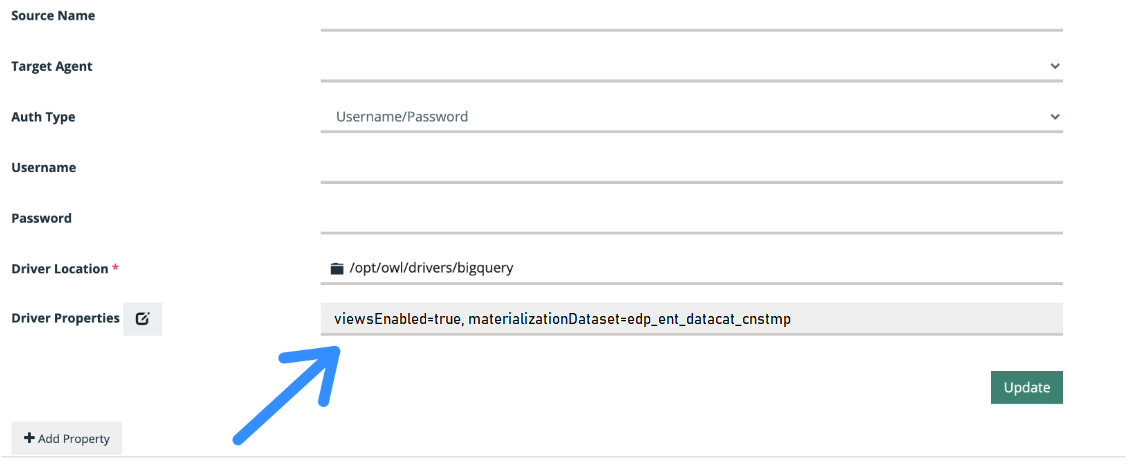
Note For read/write access to BigQuery, you can use the Spark BigQuery connector. To use this connector, ensure that the following configurations are set:
viewsEnabled is set to true.materializationDataset is set to a data set where the GCP user has table creation permission.materializationProject is optional.
Spark Version 2
Warning Be sure to use the Spark BigQuery connector that is compatible with your version of Spark.
Also, when using Spark <3 and Scala 2.11, add the following props to the connection properties:
dq.bq.legacy=true,viewsEnabled=true